Exilitay Graphics
patreon
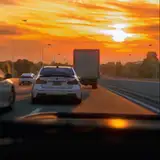
New PhotoRealism ReShade For "Exilitay Graphics" & "Exilitay Exclusive" Members!
How To Install: Put the preset inside the "assettocorsa" root folder
"C:\Program Files (x86)\Steam\steamapps\common\assettocorsa"
- Open ReShade_Setup.exe (I use v6.1.1)
- Select Acs (acs.exe)
- Select 'DirectX 10/11/12'
- Click 'Browse' & Select 'Exilitay PhotoRealism' & then 'Next'
- Finally, open AC and click the 'home' button on your keyboard to open the ReShade tab.
If you have any questions, please ask in my Discord Server :)
- https://discord.com/invite/exilitay

you're welcome! I'm glad you like my work :)
Ty my boy for keep updated your service and contents been using pure filters forever and finally found someone that surpasses Peter's pure candy filter 💯💯💯
LMAOO
Welp I’m excited to go home even more now 😂